Invoice processing may seem far from effortless for many SMEs. With manual data entry, lost invoices, slow approvals and disconnected tools, creating unnecessary friction between everyday tasks and settling expense claims. With some businesses sending travelers regularly on the road, it can be hard to distinguish between work-related expenses and travel expenses. This leads to out of control budgets and unexpected surprises.
This is where automated invoice processing comes in. By using technology like artificial intelligence and machine learning, SMEs can digitize invoices, automate approvals, and most importantly, minimize manual work. Teams can avoid paperwork pile-ups and focus on doing the work that really matters.
Want to learn tips for making invoice processing effortless? Then keep reading.
What is automated invoice processing?
Automated invoice processing means the ability to capture digital invoices, automatically extract data, create smart approval workflows and centralize storage and reporting. This process is facilitated by AI, which has the ability to read invoices and receipts. This ensures data is structured and searchable instead of scattered PDFs.

pro tip
Automated processing isn’t just for supplier invoices. With GetGoing, invoices and expenses are stored on one intelligent system.
What is traditional invoice processing?
Invoice processing traditionally involves receiving, checking, approving, storing, paying invoices.
How to implement invoice processing automation
There’s no one size fits all recipe to invoice processing, but the below step-by-step gives SMEs a practical, non‑technical roadmap.
1. Centralize invoice and expense data
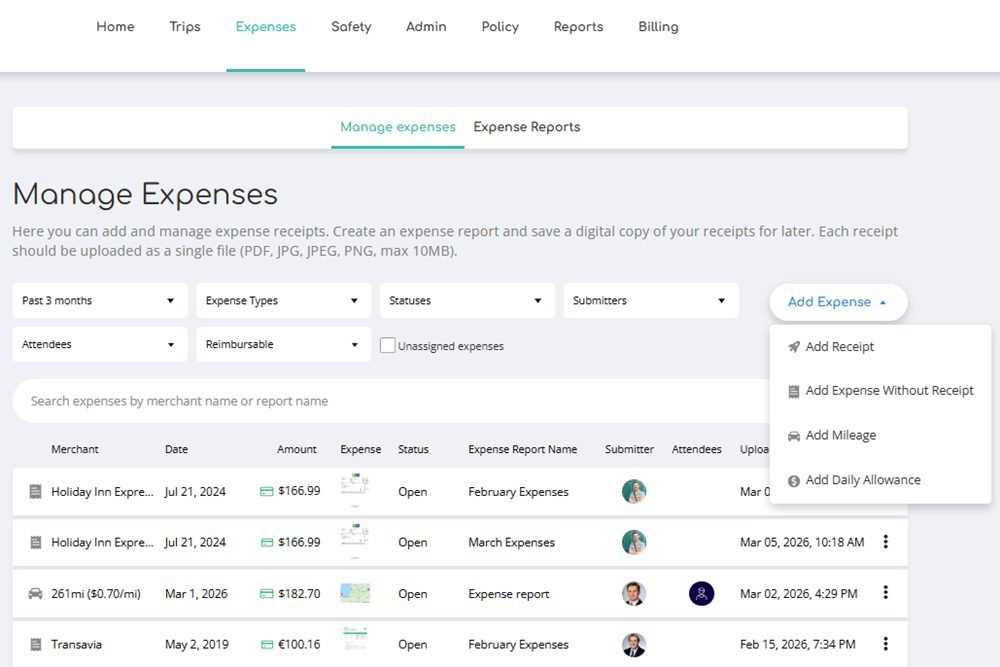
First thing’s first, you want to have one place for invoices, receipts and tracking spend. The more you can avoid multiple tools, scattered inboxes and all-over-the-place spreadsheets, the more you can streamline and centralize invoice and expense data. With a tool like GetGoing, SMEs can manage invoice and expense data together.
2. Use AI to capture and extract invoice data
Artificial intelligence is a great tool to help you achieve automated invoice processing. AI can be used to scan receipts and invoices, allowing you to extract amounts, dates, VAT and suppliers. This leads to less manual entry and fewer errors.
3. Set up approval flows
In your expense management process, it’s important to define who approves what. This means automatically routing expenses to the approver based on amount, team, or project. This reduces delays and back-and-forth emails. Simply submit expense reports and let it go to the right person to take care of approval.
4. Connect expenses to real business activity
Being able to see where your budget is going and keeping on track is important. Create expense categories so you can link invoices and expenses based on whether it is a work trip or project. Attribute the expenses to the right department, which will improve visibility and control.
5. Use data to monitor and improve
Data is your key to better operational efficiency. Tracking spending patterns and identifying bottlenecks, will help support better financial decisions.
Benefits of automated invoice processing
- Time savings – Less manual work and faster processing.
- Fewer errors – AI, together with machine learning help reduce manual mistakes when uploading receipts and reconciling.
- Faster approvals and payments – Automated workflows keeps things flowing.
- More visibility and better control – Get real‑time data for invoices and expenses to make data-driven decisions.
- Scalability- Grow processes and scale the business without increasing administrative burden
Why choose

Unlike tools that only handle invoices, GetGoing supports:
- Invoice management
- Expense management
- Travel-related and everyday office expenses→ all in one system
Best automated invoice processing software for SMEs
When it comes to the best invoice processing software, SMEs should look for functionality and features, such as:
- AI-powered invoice and receipt capture
- Approval workflows
- Centralized invoice + expense management
- Visibility into spend data
- Easy adoption for non-finance teams, meaning easy-to-use and no hassles.
This is why the best automated invoice processing software for SMEs is one like GetGoing that makes automated invoice processing effortless, bringing invoices, expenses, and spend data together in one intelligent platform. You can take care of AI receipt and invoice scanning, use automated approval flows, have invoices and expense management all in one place that works for both business travel and daily office expenses. GetGoing is designed for SMEs, not complex enterprise finance teams
Making invoice processing effortless with automation
With travel and expense management solutions like GetGoing, automated invoice processing turns from a headache to the simple click of a button. SMEs can manage invoices and expenses in one all-in-one platform independently if they’re related to business travel, supplier bills, or everyday office costs. AI-powered receipt scanning, smart approval flows, and automation makes invoice and expense management simpler, faster, and easier to scale as the business grows.
Automated invoice processing isn’t about adding more tools, it’s about working smarter with one connected system. Discover how GetGoing brings invoices and expenses together in one platform.